Top 10 Reasons My Power Wheelchair Joystick Is Flashing

Time:2026-10-24 Author:Madeline
0%

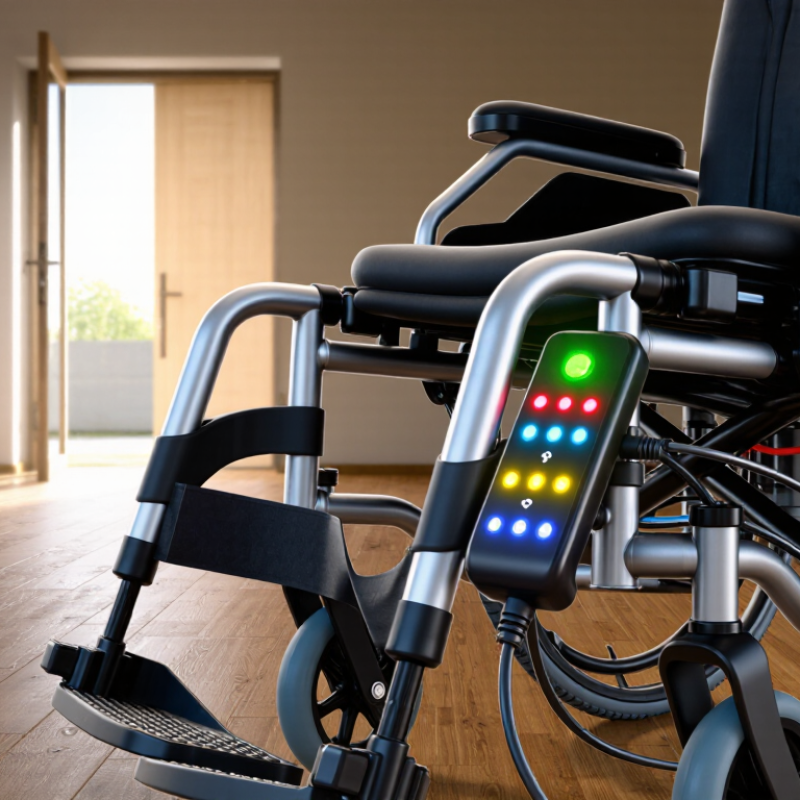
When a power wheelchair joystick starts flashing, the chair may be communicating a fault, charging condition, or safety lock. The pattern matters. One steady light differs from repeated red flashes, and each controller manufacturer uses different codes. So, why is my power wheelchair joystick flashing? The answer usually begins with the number, color, and rhythm of the flashes.

Dr. Rory Cooper, a rehabilitation engineer and wheelchair researcher, emphasizes, “Assistive technology should enhance independence, function, and quality of life.” That principle matters here. A flashing joystick can interrupt independence during a doorway transfer, shopping trip, or morning routine. Check the owner’s manual before guessing. Photograph the display. Count the flashes. Note whether the chair moves, beeps, or stops immediately. A loose battery connection, low battery voltage, engaged charger, damaged joystick cable, or motor fault may produce similar symptoms. They are not interchangeable problems.

Turn the wheelchair off before inspecting accessible connections. Never pull forcefully on cables. If the joystick flashes after charging, confirm that the charger is fully disconnected. Some systems remain locked until the joystick returns to neutral. Others require a technician’s diagnostic tool. I have seen users replace batteries too quickly, then discover a simple connector issue. That mistake is understandable, but expensive. Do not keep driving if the chair behaves unpredictably, smells hot, or loses braking. Record the flash code and contact an authorized mobility technician. This guide explains the top ten likely reasons, while recognizing that the exact answer depends on your chair’s model and controller.

Top 10 Reasons My Power Wheelchair Joystick Is Flashing

Decode Flash Patterns Using ISO 7176-14 Controls and Error Codes

A flashing joystick usually signals a control-system fault, not a dead battery alone. Common causes include low battery voltage, loose battery terminals, a disconnected joystick cable, damaged wiring, a wet control panel, a stuck joystick, brake-release problems, motor overload, charger connection, and an internal controller fault. The flash rhythm matters. Count the flashes, note the pause, and record whether the chair moves, drives slowly, or stays still.

ISO 7176-14 provides requirements for power and control systems, including safety, performance, and test methods. However, it does not create one universal flash-code language for every wheelchair. The exact pattern remains manufacturer-specific.

A two-flash sequence may indicate low voltage on one system and a communication issue on another. Treat online code charts carefully.

My practical mistake was assuming similar-looking joysticks used identical meanings; they did not. Check the chair’s service manual, then compare the code with its stated battery voltage and connector checks. Do not repeatedly reset the chair if burning smells, heat, or exposed wires appear.

Tips: Park on a level surface, switch the chair off, and inspect connectors for moisture or bent pins. Charge the batteries fully, but do not bypass safety interlocks. Photograph the flashing pattern and write down recent events, such as rain exposure, transport, or a battery replacement. If the code returns, ask a qualified technician to test the system against ISO 7176-14-related safety requirements and the chair’s service specifications.

Check the 24-Volt Power Path: Batteries, Charger, Fuses, and Voltage Drop

When a power wheelchair joystick flashes, begin with the 24-volt power path. A flashing display often means unstable supply, not a failed joystick. Inspect battery terminals for looseness, white corrosion, or heat marks. Secure connections only after switching off the chair and removing the charger. Check both batteries if the system uses a paired pack. One weak battery can pull the circuit down during acceleration or on a slope. Test under load, not only at rest. A normal reading can hide a failing cell.

Examine charger output using the chair’s service specifications, not a guessed voltage. An unsuitable or damaged charger may leave batteries partly charged. Look for frayed insulation, bent pins, or an unusually warm plug. Stop using damaged equipment. Inspect accessible fuses for cracks, darkened metal, or loose holders. Never install a higher-rated fuse. That shortcut can damage wiring. Voltage drop is easy to miss. Measure at the battery terminals, then at the controller input while the chair powers on. A sharp difference suggests resistance in a cable, connector, fuse holder, or ground return.

Record the flashing pattern and when the fault appears: after charging, under load, or during turning. This evidence helps a qualified technician avoid guesswork. Connectors may look clean yet fail when current rises; visual checks are not enough. I used to treat clean contacts as reliable, but that assumption is weak. Do not bridge fuses or open sealed battery cases. If flashing continues, isolate the chair and arrange professional testing. The exact code may vary by controller, so the correct service manual matters.

Inspect Joystick Wiring, Connectors, Moisture, and IEC 60529 IP Ratings

Top 10 Reasons My Power Wheelchair Joystick Is Flashing

A flashing joystick usually signals a communication, power, or safety fault. Common causes include loose joystick wiring, partially seated connectors, bent pins, damaged insulation, and weak strain relief. Moisture can also bridge contacts inside a plug. A low battery, controller mismatch, or overheated motor may trigger similar warnings. The light pattern matters. Record the flash count before disconnecting anything.

IEC 60529 ratings require careful interpretation. An IP54 enclosure is dust-protected and resists water splashes. It is not waterproof. An IP65 enclosure is dust-tight and tested against water jets. However, the rating applies to the tested enclosure, not necessarily the entire wheelchair or exposed connector. In workshop practice, technicians often find corrosion hidden beneath rubber boots. A dry exterior can mislead. The WHO and UNICEF Global Report on Assistive Technology (2022) estimates that more than 2.5 billion people need assistive products, increasing the importance of dependable maintenance and accessible repair skills.

Tips: Switch off power before inspection. Check the cable near the joystick base, where repeated movement causes hidden breaks. Look for green residue, moisture beads, pushed-back terminals, and cracked seals. Dry connectors naturally; avoid heat guns. Do not spray household cleaners into sockets. One rushed inspection can miss a connector that looks secure but has poor contact pressure. If the flashing continues, photograph the pattern and request a qualified service assessment. Guessing can worsen the fault.

Top 10 Reasons My Power Wheelchair Joystick Is Flashing - Inspect Joystick Wiring, Connectors, Moisture, and IEC 60529 IP Ratings

No. Possible Reason Typical Indication What to Inspect Recommended Action Moisture/IP Consideration
1 Loose joystick connector Flashing starts after vibration, transport, or adjustment of the control pod. Check that the plug is fully seated and that the locking tab is engaged. Look for bent or recessed pins. Switch the chair off, reseat the connector, and secure the cable so it cannot pull on the plug. Do not force a damaged connector. A connector may not have the same protection rating as the joystick housing. Keep the connection dry unless the equipment documentation states otherwise.
2 Damaged or stretched wiring The indicator flashes when the cable is moved, bent sharply, or caught under the armrest. Inspect the entire harness for cuts, crushed sections, exposed conductors, tight bends, and abrasion near mounting points. Stop using the chair if conductors are exposed. Have the harness repaired or replaced by a qualified technician. Damaged insulation can allow water ingress and may reduce the original enclosure protection.
3 Moisture or liquid contamination Flashing appears after rain, washing, a spill, or storage in a damp area. Look for droplets, condensation, corrosion, or a white/green residue around the joystick, cable entry, and connectors. Turn the chair off, disconnect charging power, and allow the accessible exterior to dry naturally. Do not use a heat gun or insert tools into the control. An IP rating is not a guarantee against every liquid, pressure, immersion duration, or chemical. Follow the stated product limits.
4 Joystick not centered at startup The light flashes immediately after switching on, and driving may be inhibited. Check whether the joystick is being pressed, obstructed, or held away from its neutral position during power-up. Release the joystick, keep it centered, switch the system off, wait briefly, and restart according to the operating instructions. Moisture or debris around the joystick shaft can prevent it from returning to neutral.
5 Low battery or battery connection problem Flashing occurs with weak performance, a battery warning, or difficulty starting. Check the battery indicator, charger connection, battery terminals, and accessible power cables for looseness or corrosion. Charge using the approved charger and correct procedure. Arrange a battery and connection test if the warning returns. Keep battery compartments and connectors dry. Do not spray water into electrical compartments.
6 Charging connection or charger interlock The joystick flashes or driving is disabled while the charger is connected. Confirm that the charger is fully disconnected and inspect the charging socket for bent contacts, debris, or moisture. Disconnect the charger only when safe and permitted by the instructions. Never bypass a charging safety interlock. A charging port may require its own cover or sealing arrangement; do not assume the joystick IP rating applies to it.
7 Control-system communication fault The flashing pattern persists, and the chair may not respond to driving commands. Record the number and timing of flashes, then inspect accessible control and communication connectors for poor seating or corrosion. Use the wheelchair service documentation to interpret the code. Seek qualified service if the fault remains. IP protection does not prevent faults caused by condensation, cable damage, or water entering an unsealed connection.
8 Obstruction, friction, or damaged joystick boot The joystick feels stiff, does not spring back, or flashes after contact with an object. Check for dirt, clothing, accessories, a displaced boot, or a cracked seal around the joystick shaft. Remove only loose external debris. Do not disassemble the joystick; have a damaged boot or control replaced professionally. A torn boot can compromise the intended ingress protection of the joystick assembly.
9 Electrical interference or accessory issue Flashing begins after adding an accessory or operating near another electrical device. Note when the problem occurs and check whether an unapproved accessory is connected to the chair’s electrical system. Remove the accessory only if the user instructions permit it, then request a compatibility inspection if the issue continues. Ingress protection addresses solids and water, not electromagnetic compatibility or incorrect accessory wiring.
10 Internal joystick or controller failure Flashing continues after connectors, power, moisture, and cable issues have been checked. A technician should test joystick signals, supply voltage, continuity, and the controller using the correct service procedure. Do not open or modify the control unit. Arrange diagnosis and replacement by a qualified wheelchair service professional. A stated IP rating applies only under defined test conditions and with the enclosure, seals, and cable entries intact.
Safety note: Flashing patterns are not universal. Record the exact pattern and consult the wheelchair’s operating or service documentation. Turn the chair off before inspecting connectors, and do not continue driving if steering or braking response is abnormal.
IEC 60529 IP reference: The first character describes protection against solid objects and dust; the second character describes protection against water. Common water ratings include IPX4 for splashing water, IPX5 for water jets, IPX6 for powerful water jets, IPX7 for temporary immersion, and IPX8 for continuous immersion under conditions specified by the equipment manufacturer. The rating of one component should not be assumed to apply to the complete wheelchair system.

Test Calibration, Mode Switches, and Safety Interlocks Under ISO 7176-14

A flashing power wheelchair joystick can signal more than a low battery. It may indicate failed calibration, an unintended drive command, or an active safety interlock. ISO 7176-14:2018 defines test methods for electrically powered wheelchair power and control systems, but it does not create one universal flashing-code dictionary. The controller manual and service records still matter.

Start with calibration. Turn the chair off, place the joystick centrally, and check for a sticky boot, moisture, or pressure from clothing. Power it on without touching the joystick. If the light continues flashing, record the pattern and timing. Short flashes? Count them. Then test the mode switch. A changed seating, lighting, or drive mode can make the joystick appear unresponsive. I have seen users mistake a mode lock for a controller fault. That assumption wastes time.

Check safety interlocks carefully. Confirm the charger is disconnected, the seat is fully positioned, and no tilt, recline, brake, or attendant-control command remains active. Never bypass an interlock. A technician should inspect wiring, connectors, and stored fault codes. WHO and UNICEF reported in 2022 that more than 2.5 billion people need assistive products, while nearly 1 billion lack access. Reliable troubleshooting therefore requires clear documentation, not guesswork. My own weak point is relying too quickly on familiar flash patterns; controller revisions can behave differently. Record the exact symptom before replacing parts.

Escalate to RESNA-Certified Service for Controller and Motor Diagnostics

Top 10 Reasons My Power Wheelchair Joystick Is Flashing

A flashing joystick often signals a stored fault, not a simple light problem. Common causes include low battery voltage, loose wiring, damaged connectors, moisture, or a failed joystick module. Motor brakes, drive motors, and controller communication can also trigger flashing patterns. Each pattern may carry a different meaning.

Stop and observe. Note the flash count, driving conditions, battery level, and recent impacts. Check that the charging plug is removed and connections appear secure. Do not repeatedly reset the system. That can erase useful clues. A visual check helps, but it cannot confirm an internal controller fault.

RESNA-Certified service provides a safer path for controller and motor diagnostics. A qualified specialist can read fault codes, test battery voltage under load, inspect harness continuity, and evaluate brake release signals. They can also determine whether the joystick, controller, or motor caused the warning. This matters because replacing the wrong component wastes money and may leave the chair unsafe.

I have seen users blame the joystick when a motor cable caused the flashing. That assumption is understandable, but incomplete. Diagnostic testing should come before parts replacement. If the chair moves unexpectedly, loses braking, smells hot, or stops on an incline, discontinue use and request professional service. Keep a short fault log. It may reveal a pattern that a single inspection misses.

Top 10 Reasons a Power Wheelchair Joystick Is Flashing

The chart shows a practical diagnostic-priority index based on how frequently each issue should be checked during joystick, controller, battery, wiring, and motor troubleshooting. Flash patterns vary by wheelchair system, so final diagnosis should be completed by a RESNA-certified service professional.

Start with battery charge, connector seating, cable condition, and moisture inspection. If the joystick continues flashing after basic checks, stop repeated resets and escalate for controller communication, brake, and motor diagnostics.

FAQS

Why is my power wheelchair joystick flashing?

A flashing light often signals unstable power, communication trouble, or a safety fault. It does not always mean the joystick failed. The pattern matters.

What should I check in the 24-volt power path?

Switch off the wheelchair and remove the charger. Inspect both battery terminals for looseness, white corrosion, or dark heat marks. Check every accessible fuse and connector. Never fit a higher-rated fuse.

Can a weak battery cause flashing during movement?

Yes. One weak battery can reduce voltage during acceleration or hill climbing. A resting voltage reading may look normal. Testing under load gives better evidence. I used to trust resting readings too much.

How can I identify voltage drop?

Measure voltage at the battery terminals. Then measure voltage at the controller input while the chair powers on. A sharp difference suggests resistance in a cable, connector, fuse holder, or return path. This fault can hide well.

Could the joystick cable or connector be damaged?

Yes. Inspect the cable near the joystick base, where repeated movement can break wires. Look for bent pins, pushed-back terminals, cracked seals, or green residue. A connector may look clean but fail under higher current. Visual checks are not enough.

Can moisture cause a flashing joystick?

Moisture can connect contacts inside a plug and create unstable signals. Check for water beads, corrosion, and damp areas beneath rubber covers. Let connectors dry naturally. Do not use heat guns or household cleaners.

Does a water-resistance rating protect the entire wheelchair?

No. A rating usually applies only to the tested enclosure. It may not cover exposed connectors, cables, or the whole wheelchair. Water splashes are different from immersion. Do not assume waterproof protection.

What information should I record before requesting service?

Record the flash count and when it appears. Note the battery level, recent charging, turning, slopes, or impacts. Photograph the flashing pattern if possible. Repeated resets may erase useful clues.

When should I stop using the wheelchair?

Stop using it if movement becomes unexpected, braking weakens, or the motor smells hot. Also stop if the chair loses power on an incline. Do not bridge a fuse or open a sealed battery case. Arrange qualified diagnostic testing.

Conclusion

If you are asking, “Why is my power wheelchair joystick flashing,” the light pattern may provide the first clue. Begin by recording the sequence and comparing it with the chair’s control-system guidance, including relevant ISO 7176-14 principles and displayed error codes. Then inspect the complete 24-volt power path: battery charge, charger operation, fuses, terminals, and possible voltage drops under load. A weak battery or poor connection can trigger flashing even when the chair appears powered.

Next, examine the joystick cable, plugs, and connectors for looseness, corrosion, moisture, or physical damage. Consider the protection level of the components, including applicable IEC 60529 IP ratings, but never assume water resistance eliminates the need for inspection. Calibration, mode switches, and safety interlocks should also be tested carefully according to the chair’s procedures. If the flashing continues, or if controller or motor faults are indicated, stop repeated testing and contact a qualified, RESNA-certified service professional for safe diagnostic evaluation and repair.

Madeline

Madeline

Madeline is a dedicated marketing professional with a wealth of expertise in our company's core offerings. With a keen understanding of the industry, she brings a unique perspective to her role, consistently delivering high-quality content that highlights the superior aspects of our products. As......